
 Log-In
An ATS demo can make almost any platform look impressive.
The real test starts when hundreds of applications hit one requisition, feedback stalls, interviews need rescheduling, and candidate data does not sync cleanly with your HRIS.
That is when the gap between a feature list and a workable recruiting system becomes obvious.
In 2026, choosing an ATS is less about how much functionality it advertises and more about whether that functionality actually works inside your hiring process.
This guide covers the 12 must-have ATS features that matter most, what each should accomplish, and how your team can test them before committing to a platform.
Quick Takeaways– Feature count matters less than how well the ATS fits your actual recruiting workflow. – AI ATS features should give recruiters enough visibility and control to review automated recommendations. – Integration quality depends on the data that actually moves between systems, not the number of integration logos advertised. – Turn your ATS requirements into realistic hiring scenarios and make shortlisted providers prove how their system handles them. |
What Should an ATS Do in 2026?
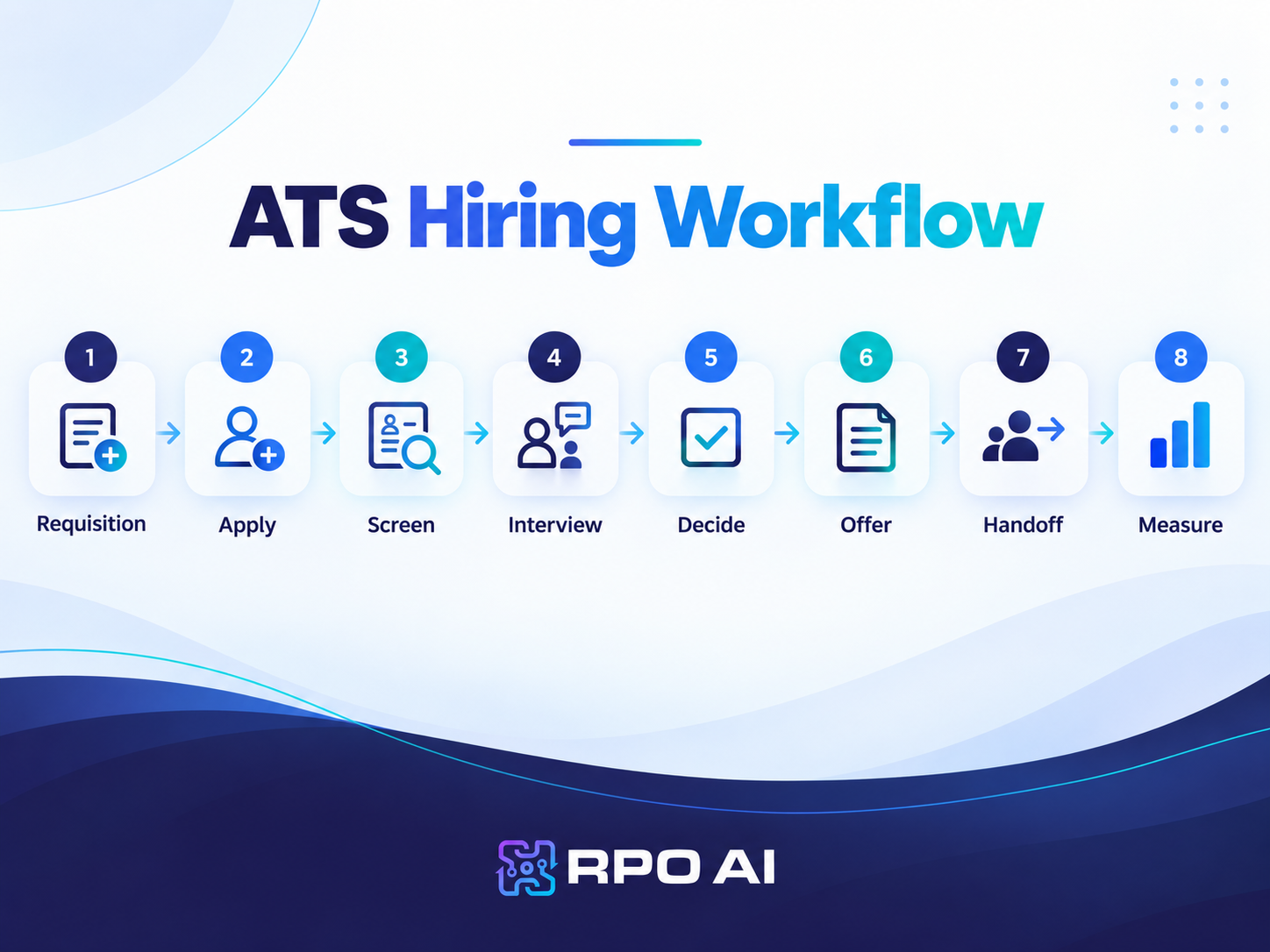
A modern applicant tracking system should manage the active hiring process from an approved requisition through candidate selection and new-hire handoff.
At minimum, it should provide one controlled environment for applications, candidate records, workflows, communication, interviews, decisions, offers, and reporting.
Modern talent acquisition technology increasingly extends applicant tracking with automation, AI-assisted matching, analytics, sourcing, and candidate relationship capabilities.
ATS vs. Recruiting CRM
The two technologies increasingly overlap, but their primary purposes remain different.
| ATS primarily | Recruiting CRM primarily |
| Manages active applicants | Manages prospective candidates |
| Supports open requisitions | Supports longer-term talent relationships |
| Tracks hiring stages | Builds and nurtures talent communities |
| Records evaluations and decisions | Supports outreach and re-engagement |
Some platforms combine both. If proactive talent pipelining matters to your hiring model, confirm the depth of the CRM capability instead of assuming it is included.
12 Must-Have ATS Features for 2026
1. Configurable Hiring Workflows
Every company has hiring stages. Problems begin when the ATS assumes every role should follow the same process.
A strong ATS should allow recruiting operations teams to configure:
– Requisition approval paths
– Candidate stages
– Stage-entry and exit rules
– Automated actions
– Hiring-manager permissions
– Workflows by department, location, or role type
A warehouse associate and a VP of Finance should not have to move through an identical process.
Configuration also needs to be practical. If changing one approval rule or pipeline stage requires a support ticket or paid professional services, the system may be configurable on paper but operationally rigid.
The value of recruitment workflow automation increases when the system can complete routine recruiting actions rather than simply notify recruiters that another task needs attention.
Vendor demo check: During the vendor demo, ask the ATS provider to configure one of your actual hiring workflows and change an approval rule or candidate stage live.
2. Job Distribution and Candidate Application Experience
An ATS should let recruiters publish a role once and distribute it to the relevant career site and recruitment channels while maintaining accurate source attribution.
Look for:
– Career-site publishing
– Job-board distribution
– Source tracking
– Mobile-responsive applications
– Configurable screening questions
– Accessible application flows
– Save-and-resume functionality for longer applications
Do not evaluate this capability only from the recruiter dashboard.
Complete an application yourself.
Application friction becomes especially important in high-volume recruiting, where unnecessary fields or a poor mobile experience can affect large numbers of candidates at once.
Vendor demo check: Apply for a role from a smartphone without help from the vendor. Count the screens, required fields, and steps that do not appear necessary to make an initial application.
3. Resume Parsing and Candidate Search
Resume parsing should do more than convert a document into a candidate profile.
The ATS should accurately extract:
– Contact information
– Job titles
– Employers
– Employment dates
– Skills
– Education
– Certifications
Good ATS functionality should then let recruiters filter, tag, search, deduplicate, review candidate history, and correct parsing errors.
A parsing engine has little recruiting value if its output cannot be searched and reused.
For example, a recruiter should be able to ask:
Which candidates in our database have cloud-security experience, are based in Texas, and previously reached a final interview?
The ATS should answer that question without requiring the recruiter to open hundreds of resumes manually.
Vendor demo check: Upload resumes with conventional, multi-column, and less-standard layouts. Check the extracted employers, dates, skills, job titles, and contact information, then search those fields.
4. AI-Assisted Candidate Matching and Screening
AI ATS features now deserve direct scrutiny because AI is increasingly being used across matching, screening, communication, and recruiting analytics.
Useful AI can support:
– Candidate-to-role matching
– Skills identification
– Resume summarization
– Application prioritization
– Screening assistance
– Talent rediscovery
AI-powered candidate matching can help surface relevant skills and career context that exact keyword matching may miss.
Buyers should also understand how recommendations are produced and how recruiters can challenge them.
Can recruiters see why someone was ranked highly? Can the criteria be adjusted? Can a recruiter override the result?
The U.S. Equal Employment Opportunity Commission explains in its guidance on AI and employment discrimination that federal employment discrimination protections continue to apply when automated technologies influence recruiting, screening, and hiring decisions (U.S. Equal Employment Opportunity Commission [EEOC], 2024).
Vendor demo check: Give the system two plausible candidates and ask why Candidate A ranks above Candidate B. Then ask the provider to show how a recruiter can review or override that recommendation.
5. Candidate Pipeline Management and Talent Rediscovery
Candidate pipeline management should show recruiters where candidates are, who owns the relationship, and what needs to happen next.
Look for:
– Configurable candidate stages
– Candidate ownership
– Next-action tracking
– Previous application history
– Interview-history visibility
– Talent pools
– Re-engagement workflows
– Previous finalist records
A strong pipeline should preserve what recruiters already know about a candidate, including previous applications, interview feedback, recruiter notes, status, and relevant next actions.
That history makes it easier to reconsider qualified candidates when an appropriate role opens instead of rebuilding the relationship from zero.
Vendor demo check: Select a previous finalist and ask the provider to show their prior interview history, move them into a new requisition or talent pool, assign an owner, and initiate re-engagement without rebuilding the candidate record.
6. Automated Candidate Communication
Recruiters should not have to remember every application confirmation, follow-up, status update, or rejection message manually.
Useful communication capabilities include:
– Automated application confirmations
– Stage-triggered emails
– SMS messaging
– Status notifications
– Rejection templates
– Personalized fields
– Segmented bulk communication
The goal is not to automate every candidate conversation.
Automation should handle predictable communication so recruiters have more time for conversations that require judgment, persuasion, empathy, or career context.
Vendor demo check: Move a candidate into a new stage and ask the provider to show exactly what communication is triggered, when it is sent, and how the recruiter can edit, pause, or personalize it.
7. Interview Scheduling and Calendar Integration
Scheduling is straightforward in theory, but it can become a recurring source of delay when calendars and workflows do not communicate.
The ATS should support:
– Candidate self-scheduling
– Calendar synchronization
– Time-zone handling
– Panel interviews
– Rescheduling
– Interview reminders
– Interviewer replacement
The practical test is not whether the platform says it integrates with calendars. It is whether that integration can handle real scheduling changes without creating more administrative work.
Vendor demo check: Schedule a four-person interview panel, change the time, and replace one interviewer without rebuilding the event.
8. Structured Interview Scorecards and Collaboration
Hiring collaboration needs more structure than a shared comment box.
A capable ATS should support:
– Role-specific interview kits
– Defined competencies
– Structured scorecards
– Required feedback
– Interviewer assignments
– Feedback reminders
– Candidate comparison
The goal is to help hiring teams compare evidence rather than impressions.
A consistent candidate screening process is easier to maintain when recruiters and hiring managers evaluate candidates against the same role-specific criteria.
Structured evaluation also improves reporting. If every interviewer uses different criteria, the ATS may collect a large amount of feedback without producing useful decision data.
Vendor demo check: Ask the provider to show how interview criteria are configured, completed, compared, and reported.
9. Offer Management and New-Hire Handoff
Your ATS should not become irrelevant the moment a hiring manager says yes.
Look for:
– Offer approval workflows
– Offer templates
– Compensation fields
– Version control
– E-signatures
– Acceptance tracking
– Onboarding triggers
– New-hire handoff
The objective is to prevent avoidable manual work between candidate selection and onboarding.
Vendor demo check: Ask the provider to generate an offer, route it for approval, revise one term, capture the candidate’s signature, and trigger the new-hire handoff.
10. Recruiting Analytics and Funnel Reporting
An ATS should help answer more than “How many hires did we make?”
Useful recruiting analytics include:
– Time-to-hire
– Time-to-fill
– Stage conversion
– Time in stage
– Source quality
– Interview-to-offer ratio
– Offer acceptance
– Candidate drop-off
– Recruiter workload
– Hiring-manager response time
The real value is diagnostic.
If time-to-fill is rising, talent leaders should be able to identify whether the delay sits in requisition approval, sourcing, screening, scheduling, hiring-manager feedback, or offer approval.
SHRM’s 2026 recruiting benchmarking data reports a median nonexecutive time-to-fill of 39 calendar days and found that extra-large organizations experienced a 67% increase in median requisitions per recruiter (SHRM, 2026).
Teams that track time-to-hire alongside stage conversion and recruiter workload can use ATS data to investigate process delays instead of simply reporting historical averages.
Vendor demo check: Give the provider sample funnel data and ask them to identify the stage creating the largest delay.
11. Integrations, APIs, and Data Portability
An ATS sits inside a wider hiring and HR environment.
It may need to connect with:
– HRIS platforms
– Calendars
– Job boards
– Assessment tools
– Background-check providers
– Onboarding systems
– Payroll
– Sourcing technology
– Analytics platforms
Do not ask only whether an integration exists.
Ask:
– Is it native or third-party?
– Which fields sync?
– Is the sync one-way or two-way?
– How frequently does data update?
– Can custom fields be mapped?
– Is API access included?
– Does the integration cost extra?
– Who owns troubleshooting when a sync fails?
Two systems can advertise the same integration while producing very different operational results.
What Happens to Your Data If You Leave?
Data portability is easy to overlook during an ATS evaluation.
Before signing, confirm whether you can export:
– Candidate records
– Original resumes
– Attachments
– Communication history
– Interview feedback
– Custom fields
– Requisition history
– Audit records
Candidate history is a recruiting asset. It shouldn’t become functionally trapped in a platform your organization no longer wants to use.
Vendor demo check: Ask the provider to show a sample full export and explain which information would not be included.
12. Security, Permissions, Compliance, and Auditability
Recruiting systems hold substantial amounts of personal candidate data. Security and governance should therefore be treated as core ATS software features, not procurement paperwork handled after the buying decision.
Look for:
– Role-based access
– Audit trails
– Data-retention controls
– Deletion workflows
– Candidate consent controls
– Regional data configuration
– Security documentation
– Documentation for AI-assisted processes
For AI-enabled workflows, confirm that the system records when automated recommendations influence a process, who reviewed them, and what action was ultimately taken.
The NIST Artificial Intelligence Risk Management Framework identifies considerations such as reliability, accountability, transparency, explainability, privacy, security, and fairness when organizations manage AI risk (Tabassi, 2023).
Do not assume that purchasing software with compliance features automatically makes an organization compliant. The ATS can support compliance processes, but employers remain responsible for how the system is configured and used.
Vendor demo check: Ask the provider to show the audit history for one candidate record, including who accessed or changed information.
RPO.ai ATS Feature Proof Test
A feature should not receive credit simply because it appears on a comparison sheet.
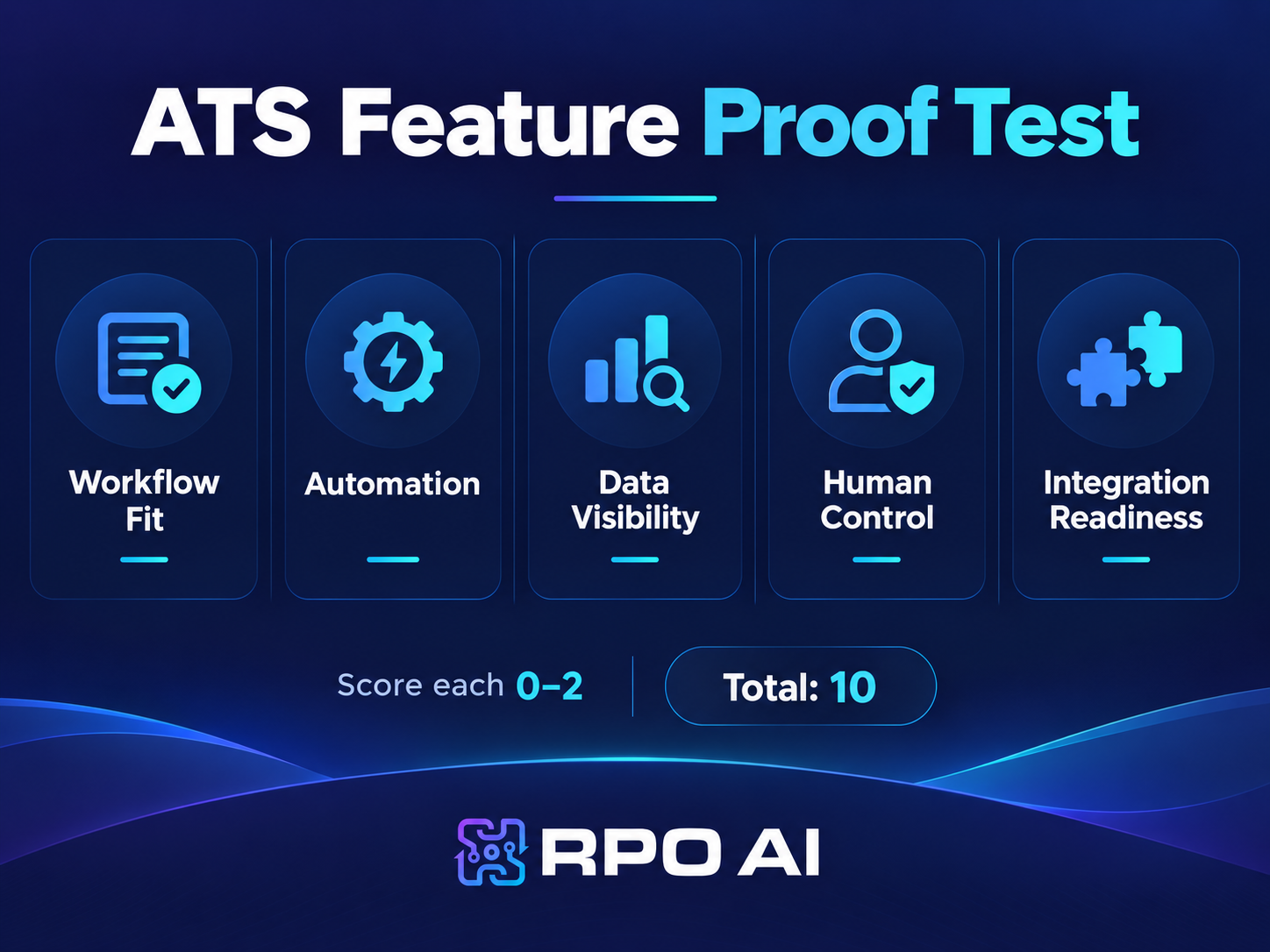
Use the RPO.ai ATS Feature Proof Test to evaluate each shortlisted platform across five operational dimensions.
Evaluation area | Question to answer |
| Workflow fit | Can the ATS support your real hiring process without major workarounds? |
| Automation depth | Does automation complete useful work rather than simply generate alerts? |
| Data visibility | Can recruiters and leaders easily access the information they need? |
| Human control | Can users understand, review, and override automated recommendations? |
| Integration readiness | Does recruiting data move reliably between systems? |
Score each area from 0 to 2:
– 0: Does not meet the requirement
– 1: Partial fit or significant workaround required
– 2: Strong operational fit
Score Interpretation
– 0–3: Weak operational fit
The system is likely to create substantial workarounds.
– 4–7: Viable with documented gaps
The platform may work, but implementation requirements and compromises need to be understood before purchase.
– 8–10: Strong operational fit
The tested workflow is supported with limited friction, useful data visibility, appropriate human control, and connected systems.
The score should support the buying decision, not make it automatically. Security review, implementation capability, commercial terms, data migration, support, and change management still matter.
Which ATS Features Matter Most for Different Hiring Models?
Not every organization should weight all 12 features equally.
Hiring environment | Features to prioritize |
| Growing company | Simple workflows, easy applications, scheduling, communication, integrations |
| High-volume hiring | Mobile applications, screening automation, bulk actions, communication, funnel analytics |
| Specialist recruiting | Advanced search, matching, candidate rediscovery, structured evaluation |
| Multi-location enterprise | Permissions, configurable workflows, integrations, governance, reporting |
| Data-driven TA team | Funnel analytics, APIs, source quality, customizable reporting, predictive insights |
A smaller organization does not need enterprise complexity simply because it may need it someday.
The reverse is also true. A platform designed for simple hiring processes can become operationally expensive when the organization needs multiple approval paths, locations, integrations, or business-unit workflows.
Common ATS Buying Mistakes
Failing to Separate Must-Haves From Nice-to-Haves
Define non-negotiable ATS requirements before vendor demonstrations begin.
Otherwise, impressive secondary capabilities can distract the buying team from the workflows and integrations the organization genuinely needs.
Underestimating Administration and Implementation
The software subscription is only one part of an ATS rollout.
Determine who will configure workflows, migrate data, build integrations, create templates, establish permissions, train users, and maintain the system after launch.
Testing Only With Clean Demo Data
Prepared demo environments are designed to work.
Test realistic resumes, incomplete profiles, duplicate candidates, unusual approval paths, scheduling changes, and messy historical records.
An ATS should be evaluated against the conditions your recruiting team will actually encounter.
Ignoring Data Migration Quality
Moving old candidate data into a new system does not automatically make that data useful.
Duplicate records, inconsistent fields, outdated statuses, and incomplete candidate histories should be addressed as part of migration planning.
Evaluating Software Without Evaluating Support
Understand what happens after implementation.
Ask about support response times, escalation routes, configuration assistance, administrator training, implementation ownership, and which services cost extra.
The Bottom Line
The best ATS in 2026 is not the platform with the longest feature list.
It is the system whose ATS functionality fits the way your organization hires, moves data reliably across the recruiting stack, gives teams useful insight, and removes repetitive work without taking judgment away from recruiters.
Before making a decision, map three real hiring scenarios: one common role, one difficult role, and one process involving several stakeholders or integrations. Make every shortlisted provider demonstrate those same scenarios.
Do not ask only whether a feature exists.
Ask whether it can do the job your recruiting team actually needs it to do.
Frequently Asked Questions
What are the most important ATS features?
The most important ATS features include configurable workflows, candidate applications, resume parsing and search, AI-assisted matching, pipeline management, communication, scheduling, structured evaluation, offer management, analytics, integrations, and security controls. Their relative importance depends on your hiring volume and complexity.
What should you look for when choosing an ATS?
Start with the hiring process rather than a vendor feature list. Define your ATS requirements, then test workflows, administration, search, analytics, integrations, candidate experience, security, data portability, and implementation requirements using realistic recruiting scenarios.
Should an ATS include AI in 2026?
AI can support matching, screening, resume summarization, candidate rediscovery, and analytics. However, AI ATS features should provide appropriate transparency and human control so recruiters can understand how recommendations affect the process and review or override them where necessary.
What is the difference between an ATS and a recruiting CRM?
An ATS primarily manages applicants connected to active hiring processes. A recruiting CRM focuses on prospective candidates, talent communities, outreach, and longer-term relationship management. Some platforms combine both, so buyers should assess the depth of each capability.
What integrations should an ATS support?
Prioritize systems directly involved in the hiring process, including your HRIS, calendars, email, job boards, assessments, background checks, onboarding tools, sourcing platforms, and analytics systems. Evaluate which fields move, in which direction, and how reliably, rather than simply counting integration logos.
Ready to Find the Right ATS for Your Hiring Team?Discover how RPO AI can help you assess your hiring needs, improve recruiting workflows, and identify the right technology to support your recruitment goals. |

Rameet Singh, Founder & CEO of RPO.AI